| Author |
tips and tricks for nokia symbians |
masseur
Joined: Jan 03, 2003
Posts: > 500
From: Sydney, London
PM |
hows that? I have to:-
click options
down arrow 5 times to Navigation option
click joystick in for popup menu and click joystick in for reload.
please tell me how to do that in 3 steps. I remember on older Nokias you can press a number that represented the menu item position but that doesn't seem to work here
|
|
|
BobaFett
Joined: Jan 06, 2004
Posts: > 500
From: Kamino (wish it would be Lund)
PM, WWW
|
mea culpa its 4 
click option
right
up ( dont forget, u can scroll up and down to access a menu poin )
click reload ( thatswhy i mentioned before, its at the bottom )
|
masseur
Joined: Jan 03, 2003
Posts: > 500
From: Sydney, London
PM |
I have no idea what phone you are looking at but this is not how it is on N95
In options I have:
Subscribe
Go to Web Address
Bookmarks
Save as Bookmark
Rotate screen
Navigation options
zooming options
window
clear privacy data
tools
find
settings
help
so to do a reload is as I said before
|
BobaFett
Joined: Jan 06, 2004
Posts: > 500
From: Kamino (wish it would be Lund)
PM, WWW
|
got e60 here, it has the same browser as n95 ( its actually the same since 6680 )
when u are browsing and u click "navigation options" what are there listed?
|
masseur
Joined: Jan 03, 2003
Posts: > 500
From: Sydney, London
PM |
navigation options are:-
reload
history
page overview
thats all
|
BobaFett
Joined: Jan 06, 2004
Posts: > 500
From: Kamino (wish it would be Lund)
PM, WWW
|
u, just hitted my mind, u probably use web browser and i services...
here is the services menu, maybe thatswhy the different way
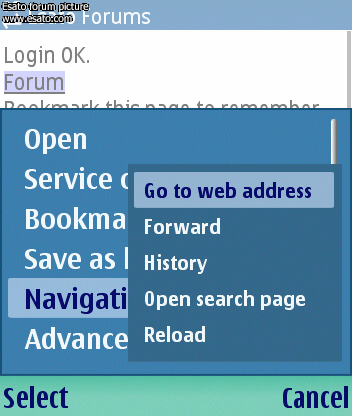
|
masseur
Joined: Jan 03, 2003
Posts: > 500
From: Sydney, London
PM |
yes, I am using web browser. my question asked:
Is there a browser shortcut for "reload"? can't seem to find that one
I don't know what services are... whats that?
|
BobaFett
Joined: Jan 06, 2004
Posts: > 500
From: Kamino (wish it would be Lund)
PM, WWW
|
services is also a browser ( nokia decided to make 2, donnow why ) since os 3rd edition is out. u can access in services wap pages too, cos the "browser" is only for html pages ( u can use there the minimap etc , it doesnt work in services )
probabyl thyt "browser" is way too spesific and wap pages arent supported.
|
masseur
Joined: Jan 03, 2003
Posts: > 500
From: Sydney, London
PM |
I almost never do wap, except to check problems on Esato wap pages.
so how do I start this services?
|
BobaFett
Joined: Jan 06, 2004
Posts: > 500
From: Kamino (wish it would be Lund)
PM, WWW
|
pls check here the 4th pic, its there shown
http://www.esato.com/board/viewtopic.php?topic=147204
the right settings should be done before u start, just check the settings for it, the same as at "web browser"
@masseur
"Gone is the confusing Services application which was actually a WAP browser: now web handles both HTML sites and WAP sites. This means when you click on a URL in email, it won't launch that darned Services WAP browser which fails to render standard HTML web sites. As mentioned on other recent S60 3rd Edition phone reviews (Nokia E61, E62, N73, N80 and N91), the web browser is the best we've seen on a mobile phone, smartphone or PDA. It does an admirable job of reproducing the desktop experience in terms rendering layout, dHTML (i.e.: dynamic menus) and Javascript."
source : http://www.mobiletechreview.com/phones/Nokia-N95.htm
so they have a new browser again... ( its the 3rd variation since 6630 )
_________________
Aquila non capit muscas-Cand. Mag Mt. S.V.P.E.N. MTL  -/// 4ever! -/// 4ever!
/// Ericsson Forum
[ This Message was edited by: BobaFett on 2007-05-16 12:46 ] |
mib1800
Joined: Mar 18, 2004
Posts: > 500
PM |
in n95, just click on the page (not on a link of course) and the floating menu will popup. You can select reload from here easily. |
Dogmann
Joined: Jan 29, 2006
Posts: > 500
From: London England
PM |
Hi all,
I think this works on all S60's although i have only used it on my E61 select calendar and then just start starting typing and it automatically enters the text in a new entry much quicker than selecting options, new entry.
Marc
_________________
Nokia E61 2gb Sandisk, Fring, Tom Tom 6, AD-46 with Black Shure EC2g
[ This Message was edited by: Dogmann on 2007-05-16 14:02 ] |
BobaFett
Joined: Jan 06, 2004
Posts: > 500
From: Kamino (wish it would be Lund)
PM, WWW
|
yeah, i use that way too, very fast.
|
BobaFett
Joined: Jan 06, 2004
Posts: > 500
From: Kamino (wish it would be Lund)
PM, WWW
|
*#7370# - Factory reset (the default lock code is 12345)
*#62209526# - Show the WLAN MAC address
*#2820# - Show the bluetooth address
Also, if the phone won’t boot and hangs on the startup screen (white background, blue Nokia logo), you can initiate a factory reset by holding *, 3 and the green button.
works with e series, guess with n too
_________________
Aquila non capit muscas-Cand. Mag Mt. S.V.P.E.N. MTL -/// 4ever!
/// Ericsson Forum
[ This Message was edited by: BobaFett on 2007-05-17 14:31 ] |
batesie
Joined: Feb 13, 2004
Posts: > 500
From: London, UK
PM |
On 2007-05-17 15:30:02, BobaFett wrote:
*#7370# - Factory reset (the default lock code is 12345)
*#62209526# - Show the WLAN MAC address
*#2820# - Show the bluetooth address
Also, if the phone won’t boot and hangs on the startup screen (white background, blue Nokia logo), you can initiate a factory reset by holding *, 3 and the green button.
works with e series, guess with n too
_________________
Aquila non capit muscas-Cand. Mag Mt. S.V.P.E.N. MTL -/// 4ever!
/// Ericsson Forum
[ This Message was edited by: BobaFett on 2007-05-17 14:31 ]
cool thats really handy, now i can add my N95's MAC Address to my Router at home and make it more secure  [addsig]
 |
|
|



 Posted: 2007-05-16 12:31


