| Author |
Speed up your phone |
MichaelMac
Joined: May 25, 2006
Posts: 15
From: Brighton, UK
PM |
Ok I've done this with many phones over the years and it may have been posted already. But....
There is a simple and effective procedure to freeing up memory on the memory stick...basically when you put something on the stick it stores in a system the phone can understand and find easily and quickly, but... over time just like a PC the phone can slow down with the amount that is transferred to and from the phone.
Just like on a PC try this...
- connect your phone using the data cable ONLY
- go into " my computer " and locate the memory stick
- right mouse button click the icon for the memory stick
- click on " properties"
- click on the " tools " tab
- then click on " defragment now "
Just like you would do on the PC, but trust me it free's up space and ever so slightly speed's up the phone's response time in locating and opening files/folders.
This only works when you do it every so many months 
Hope this can be of some use to you! |
|
|
jack77777
Joined: Apr 11, 2006
Posts: > 500
From: uk/england.
PM |
it deletes your files though dont it ? |
bugsiiy
Joined: Jan 10, 2006
Posts: > 500
PM |
no,but there is a slight chance to f**k everything up on the memory stick which will requier a format |
E-Demon
Joined: Apr 29, 2006
Posts: 74
From: Liverpool/UK
PM |
Doesnt delete the files, defragmenting only reorganises the clusters etc.
It's debatable whether this has any effect on the phone's reading/writing..I myself havent seen any improvement.
It still takes a whole 5mins after inserting the memory stick before I can read/write using the phone without crashing it and having to remove the battery/reboot etc.
|
bugsiiy
Joined: Jan 10, 2006
Posts: > 500
PM |
since the defragmenting is done with windows (which screwed up my computer twice,using the built in defragmenter) i only warn you that it might,you never know what could happen,it's true probably it will work flawlessly but there is a chance that something might go wrong |
masseur
Joined: Jan 03, 2003
Posts: > 500
From: Sydney, London
PM |
defragging a memory stick does NOT delete files (just like it does not on a PC!), it also won't mess up anything requiring a reformat.
However, we have had a lot of discussions on this topic and indeed, we have a Memory Stick FAQ which links to a discussion of "Is it safe to defrag my mem card"
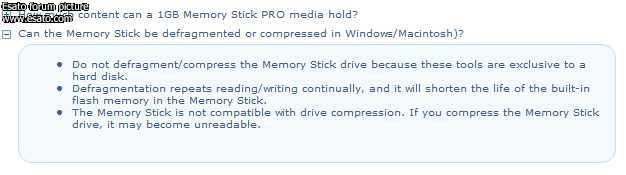
but probably, and most importantly, Sony themselves say...
|
Scorpio72
Joined: Nov 13, 2004
Posts: 118
PM |
The best defragmenting methode is to move all the content of the memory stick to a folder on your PC and reformat the stick and then, move all the folder content back to the stick. This is a safe and fast defrag.
This message was posted from a K750 |
MichaelMac
Joined: May 25, 2006
Posts: 15
From: Brighton, UK
PM |
3 years of memory stick defragging and i've not had one problem whatsoever! so must be something the user does!
All it does is move files! |
deluded
Joined: Sep 14, 2005
Posts: > 500
PM |
I agree with scorpio, the safest way would be to copy your files onto your hard-disk before formatting your memory stick. Of course you never know if anything might screw up, but it's still safer. Personally i use the defrag myself quite often. Once in a long while i'll use the other method. The effects vary from phone to phone i guess.
[ This Message was edited by: deluded on 2006-05-26 18:35 ] |
deepsme
Joined: Mar 30, 2006
Posts: > 500
From: New Delhi, India
PM |
what bout the scan-disk tool can it solve any errors on my memory stick?
has anyone run it on their cards.
here, have a puff  |
baste07
Joined: Nov 07, 2002
Posts: > 500
PM |
Quote:
|
On 2006-05-26 12:17:45, MichaelMac wrote:
3 years of memory stick defragging and i've not had one problem whatsoever! so must be something the user does!
All it does is move files!
|
|
does it take a long time to read from your memory stick that is why you're defragmenting it? |
jack77777
Joined: Apr 11, 2006
Posts: > 500
From: uk/england.
PM |
wot is a good time to defrag a memory stick , like 3 months cos its only a 1gb , wotta u guys think ?.
15% online - Sony Ericsson - "4 lyf" |
jack77777
Joined: Apr 11, 2006
Posts: > 500
From: uk/england.
PM |
i tried defraging my sony high speed 1gb mem stick pro duo , but it says he card has errors on it , i run scandisk on it and the only errors are stupid ones like stuff to do with song names and stuff.
i think its best not to defrag memory cards , in my opinion , by the time the card is getting very slow people will probably have a new mem card or phone by then.
also if you turn your phone off and on ad leave it for an hour off , that makes it quicker as it does with a pc.
15% online - Sony Ericsson - "4 lyf" |
|
|


 Posted: 2006-05-25 16:28


