| Author |
Accessing files on C905 over wifi |
yea g
Joined: Jul 02, 2008
Posts: > 500
From: New Zealand
PM, WWW
|
Dunno if its already been posted but here is a tutorial of how to access files on your C905 using your wifi connection.
Step 1.
Menu>Settings>Conectivity>Network sharing.
Configure settings like this: (Just choose a random username+pass (my one is A for both))
UPDATE:
On the new firmware, it seems this menu has been changed to just have an on/off option. Make sure its on!
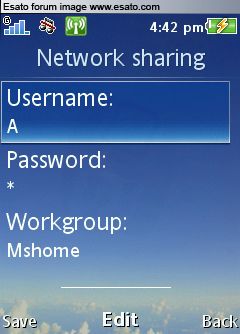
(note: If you changed the default workgroup when you ran the set up home or office network wizard then use that)
Step 2.
Menu>Settings>Conectivity>Wifi
Scroll down to your wifi network and press options
Then scroll to edit settings like so:
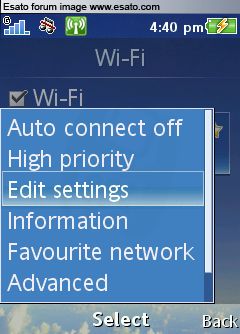
Click on edit settings and scroll to Network Sharing
Make sure it is on
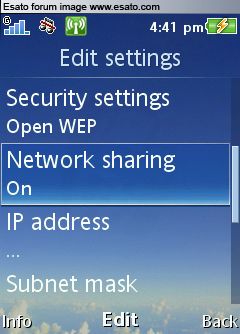
Step 3.
In windows explorer type \\C905 in the address bar (Or enter the phone name that you set in the conectivity menu
(You may have to enter username+password, if so then enter the ones you used in step 1)
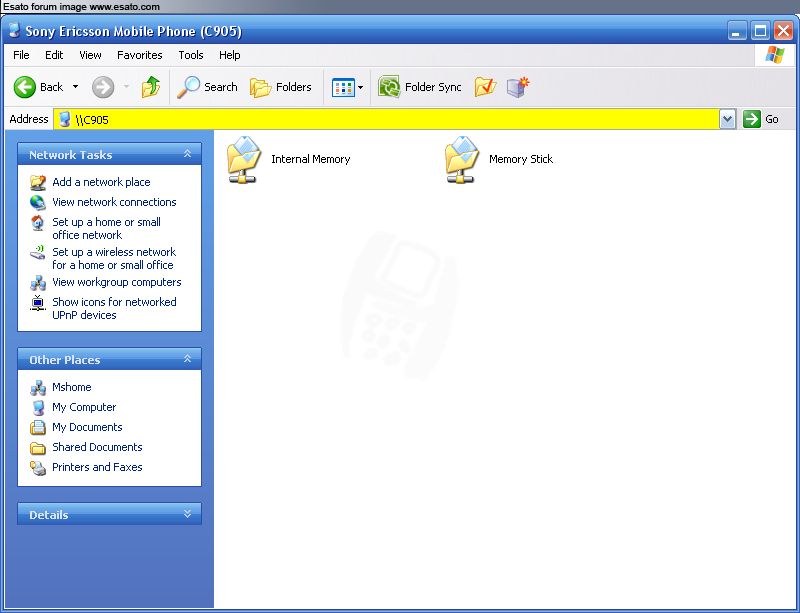
Enjoy! No wires, and no bluetooth so it works on desktops!
[ This Message was edited by: yea g on 2009-02-21 22:42 ] |
|
|
sowbran
Joined: Jun 11, 2006
Posts: 158
From: Mexico
PM |
wow thanks so much greetings |
gtr83
Joined: Sep 27, 2008
Posts: > 500
From: Indonesia
PM |
Thx a lot yea g, gonna bookmark this for when mine arrives  |
goldenface
Joined: Dec 17, 2003
Posts: > 500
From: Liverpool City Centre
PM |
Great stuff? Yea G.
Doesn't this also mean its possible to access the media files on your laptop from your C905?

|
yea g
Joined: Jul 02, 2008
Posts: > 500
From: New Zealand
PM, WWW
|
Err dunno about that.
|
masada1971
Joined: Jun 05, 2008
Posts: > 500
PM |
thanks for the tutorial..works like a charm with my vaio and vista..i have access to media files as well pics,videos etc.. 
[ This Message was edited by: masada1971 on 2009-01-10 09:11 ] |
yea g
Joined: Jul 02, 2008
Posts: > 500
From: New Zealand
PM, WWW
|
You know, if you set up your router to allow port 80 connections, you could type into a webbrowser anywhere in the world http://[your ip]/C905. I think, I'm not to sure since the telecom firmware on my router stops me from port forwarding.
|
StarZtorm
Joined: Dec 05, 2002
Posts: 1
From:
PM |
Thanks! been wondering how to make it work the username\\password is case sensitive. |
5N4K3
Joined: Jan 22, 2009
Posts: 17
PM |
i doesn't seem to work with me i entered the right phone name but still it gives me a msg saying that check the name...any help...did everything as told |
nezbit
Joined: Mar 18, 2009
Posts: 1
PM |
Great tip, works a treat.fil
If anyone knows how to do it the other way and access files on the network from my phone please let me know?
cheers
Nezbit |
therealdeal
Joined: Mar 16, 2009
Posts: 5
From: out of NAIJA
PM |
hey, does this work only with the C905? :-/ |
yea g
Joined: Jul 02, 2008
Posts: > 500
From: New Zealand
PM, WWW
|
Hould work on any  featurephone with wifi (g705, C905, W715, W705 etc.) featurephone with wifi (g705, C905, W715, W705 etc.)
|
fjnty5
Joined: Mar 04, 2009
Posts: 36
PM |
dam good m8! |
yea g
Joined: Jul 02, 2008
Posts: > 500
From: New Zealand
PM, WWW
|
On 2009-01-22 23:11:54, 5N4K3 wrote:
i doesn't seem to work with me i entered the right phone name but still it gives me a msg saying that check the name...any help...did everything as told
Sometimes you need to restart your pc/phone/router the first time.
|
TomEngland
Joined: Feb 26, 2009
Posts: 80
From: Scun7horpe, UK
PM |
Amazing! thanks so much easyer for pulling music off my phone @ school
W800i > W810i > K800 > K810i > C905 I  My Life |
|
|


 Posted: 2009-01-10 04:56


 My Life

